
Deploy to AWS
From an empty account to a signed-in console: the one-click bootstrap and the first pipeline run.
The whole deploy is one CloudFormation stack and a wait. The stack creates only what Terraform cannot create for itself (the state bucket, the secrets, the config record, a scoped deploy role and the CodeBuild projects), then starts a pipeline that builds the images and applies the environment. Nothing runs on your laptop. What gets built is described on Deployment: AWS.
Known gap in the v2.0.0 pair
cvhome v2.0.0 needs UAA_IMPERSONATION_SECRET bound to uaa and store-core-gateway. cvhome-platform v2.0.0 does not generate or bind it; the fix is cvhome-platform#6 and lands in the next release. Deploying 2.0.0 needs that fix plus a stack update. The current main of cvhome-platform already binds the key from the sso secret.
Prerequisites
- An AWS account and console access. The stack launches in whichever region the console is in.
- A public Route53 hosted zone for a domain you own, in the same account. The application is served from it and the certificates are validated in it.
- A Stripe secret key (a test key is fine). The parameter is optional; without it billing has no Stripe and the webhook registration is skipped.
- A project id: 2 to 18 lowercase characters, stable per account. Every environment in the account shares it, and it prefixes every resource and ECR path.
- An environment name of at most 10 characters. One stack is one environment; project + env together must stay at 34 characters or fewer.
- A flavour (
dev,staging,prod,ephemeral) and a pod count. Each additional pod is roughly a second small environment: its own RDS instance, network load balancer, CloudFront distribution and nine ECS services. - No local credentials, Terraform or Docker: CodeBuild does the building and applying.
1. Launch the stack
The Launch Stack button in the cvhome-platform README opens the CloudFormation Create stack review page in your current region, with the stack name cvhome-platform and the template URL https://cvhome-saas.s3.eu-central-1.amazonaws.com/platform/bootstrap.yaml. The button points at S3 rather than GitHub because the console only accepts an S3 template URL; the publish bootstrap workflow uploads bootstrap/bootstrap.yaml on every push to main, after cfn-lint passes.
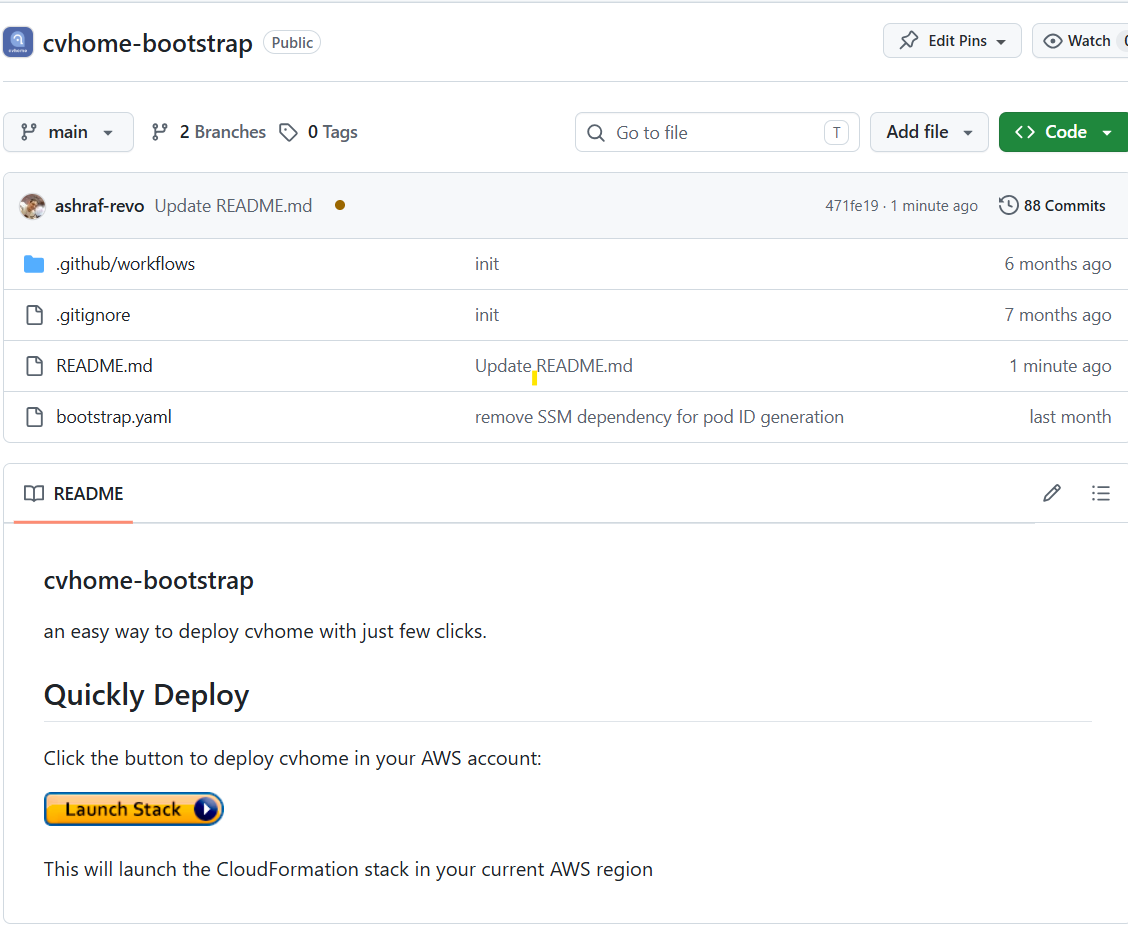
Captured on the 1.x bootstrap (the cvhome-bootstrap repository). The button and the "current region" note look the same today; the repository is now cvhome-platform.
2. Fill in the parameters
The form has four groups: Environment, Store pods, Integrations and Source. Every parameter comes from bootstrap/bootstrap.yaml:
| Parameter | Label | Default | Constraint | What it does |
|---|---|---|---|---|
ProjectId | Project id | cvhome | ^[a-z0-9][a-z0-9-]{1,17}$ | Stable identifier shared by every environment in the account. Deliberately not random. |
EnvName | Environment name | dev | ^[a-z0-9][a-z0-9-]{0,9}$ | One stack is one environment. Below prod every hostname sits under this label. |
Flavour | Flavour | dev | dev, staging, prod, ephemeral | Sizing, capacity, RDS, logs, monitoring and networking as one set. |
DomainZoneId | Route53 hosted zone | none | a hosted zone id in the account | The zone the application is served from and the certificate validated in. |
PodCount | Additional store pods | 0 | 0 to 20 | Pods in addition to the default one. |
StripeKey | Stripe secret key | empty | NoEcho | Bound to the billing service. |
GithubAccount | GithubAccount | cvhome-saas | ^[A-Za-z0-9_-]+$ | GitHub account both repositories are read from. |
PlatformRepo | PlatformRepo | cvhome-platform | The infrastructure repository. | |
AppRepo | AppRepo | cvhome | The application repository. | |
Branch | Branch | main | Branch of both repositories the pipeline builds and applies from. The image build ignores it when ImageTag names a release. | |
ImageTag | Product version | latest | latest or X.Y.Z (optional pre-release suffix) | The product version to deploy. Written to SSM as image_tag; envs/<env>.tfvars overrides it once a promotion PR has landed. |
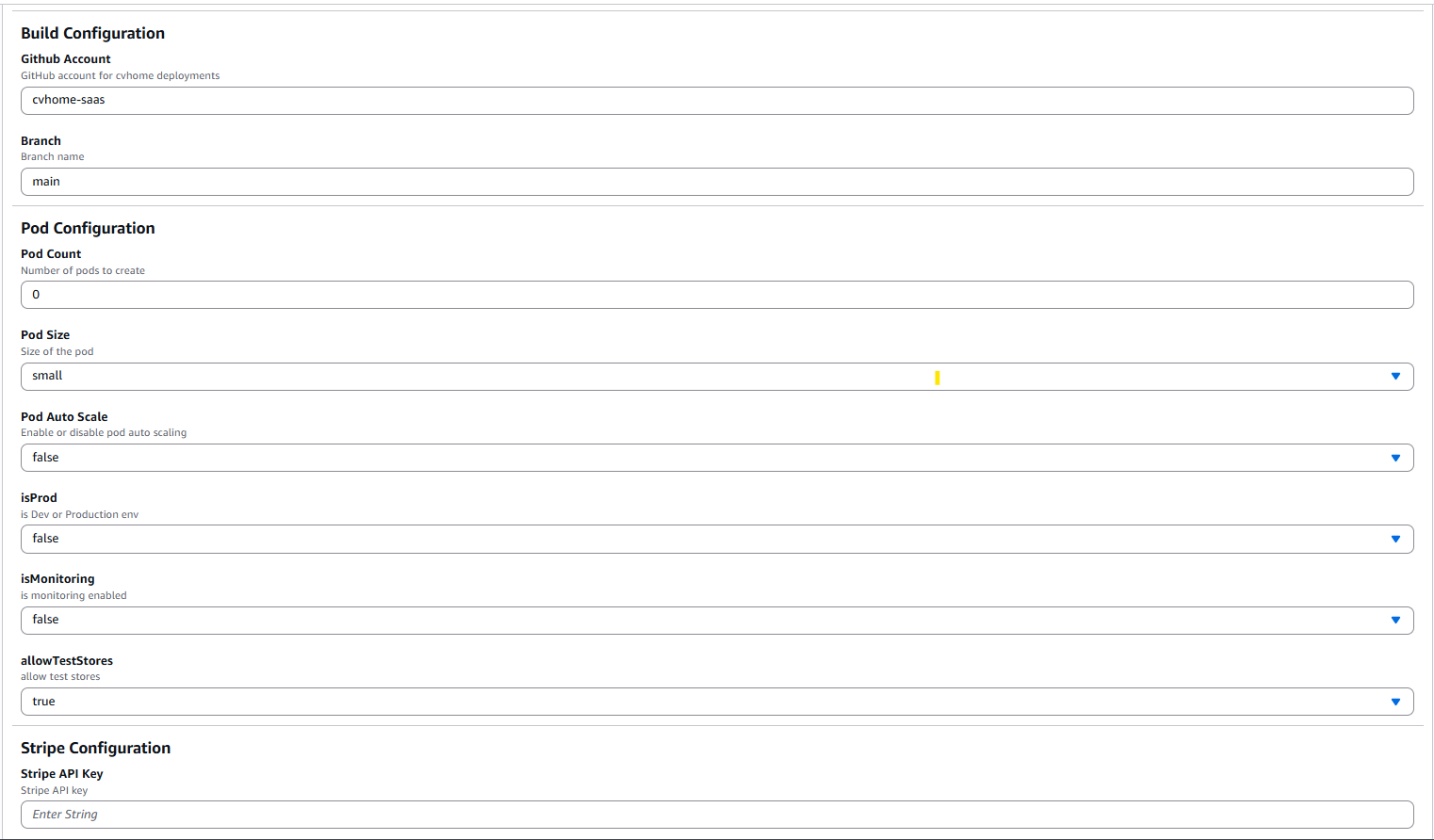
Captured on the 1.x bootstrap, which asked for Pod Size, Pod Auto Scale, isProd, isMonitoring and allowTestStores. The current form has these parameters: ProjectId, EnvName, Flavour, DomainZoneId, PodCount, StripeKey, GithubAccount, PlatformRepo, AppRepo, Branch, ImageTag. The four legacy booleans became Flavour.
Acknowledge that the template creates IAM resources and create the stack.
3. What the stack creates
| Resource | Name or shape |
|---|---|
| Terraform state bucket | <project>-<env>-tfstate-<account>-<region>, versioned, encrypted, retained on stack deletion |
| Secrets | /<project>/<env>/stripe (the key you typed, plus an empty webhook signing key filled in by 3-apply), /<project>/<env>/uaa (a generated 24-character admin password), /<project>/<env>/sso (uaa's client secrets, remember-me keys and one crypto key per layer, generated by a Lambda that adds missing keys on update and never rotates) |
| SSM parameters | /<project>/<env>/config (project, env, flavour, region, zone, image tag, generated pod ids, state bucket) and /<project>/<env>/hibernated (false) |
| IAM | DeployRole (explicit statements, used by the Terraform projects) and BuildRole (used by the image builds) |
| CodeBuild projects | <project>-<env>-1-prereq, -2-images, -2-images-native, -3-apply, -destroy, -hibernate, -wake |
| EventBridge rules | 1-prereq SUCCEEDED starts 2-images; 2-images or 2-images-native SUCCEEDED starts 3-apply |
| Lambdas | the pipeline starter (runs once on create and starts 1-prereq), the sso secret filler, the pod id generator, and the daily hibernation keeper |
4. Read the Outputs tab
When the stack reaches CREATE_COMPLETE its Outputs tab lists ProjectId, Environment, Flavour, StateBucket, Registry (the ECR path the images are pushed to), NativeImageProject, ConfigParameterName, HibernateProject, WakeProject, PipelineConsole and StripeWebhookPath.
5. Watch the pipeline
The stack starts 1-prereq by itself; each stage starts the next only on success, so a failure stops the line. Open CodeBuild, or follow the PipelineConsole output link.
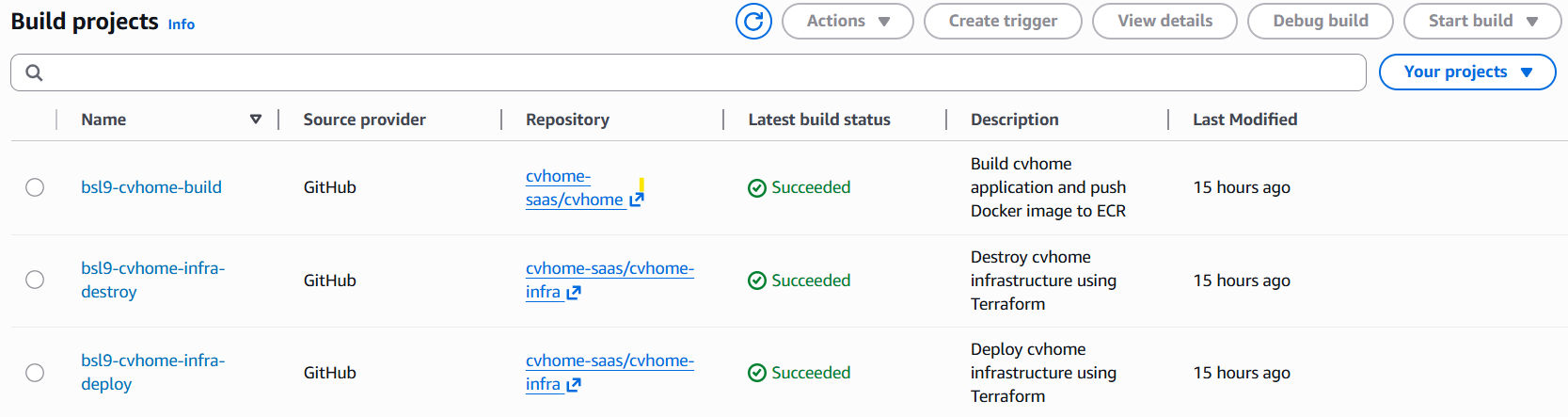
Captured on the 1.x bootstrap, which had three projects (build, infra-deploy, infra-destroy). The current stack creates seven: 1-prereq, 2-images, 2-images-native, 3-apply, destroy, hibernate and wake, all named <project>-<env>-....
| Stage | Compute | What it does | Typical duration |
|---|---|---|---|
1-prereq | SMALL | terraform apply of prereq/: one ECR repository per catalog image, the regional and the us-east-1 ACM certificates with DNS validation, and the /<project>/<env>/prereq SSM record. Prints repository_count. | minutes |
2-images | LARGE, privileged | Clones cvhome at v<ImageTag> (or Branch when the tag is latest), Corretto 25, ./gradlew bootBuildImage --publishImage -Pversion=<tag> -x test -x check, 15 images pushed to ECR. | about 15 minutes measured (826 s), less with a warm cache |
3-apply | SMALL | terraform apply of the environment root with envs/<env>.tfvars, then registers the Stripe webhook at https://<env-domain>/billing/api/v1/stripe-webhook/public/events and prints console_url. | minutes, plus ECS task startup |
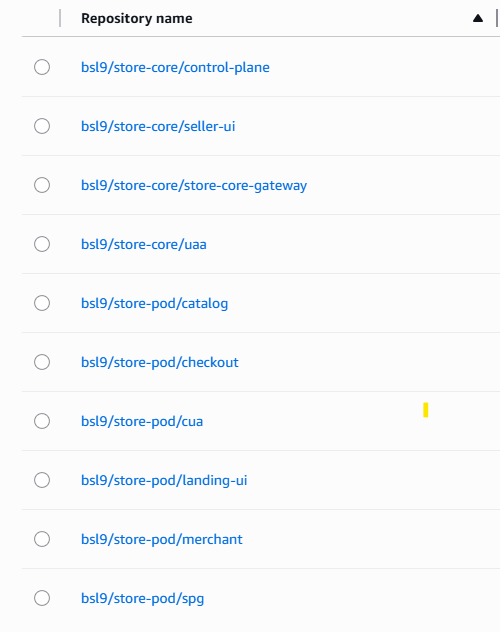
Captured on the 1.x stack: it shows control-plane and seller-ui, which are now tenancy and console-ui, and lacks billing, pod-registry, content and inventory. Today 1-prereq creates 15 repositories under <project>/store-core/... and <project>/store-pod/....
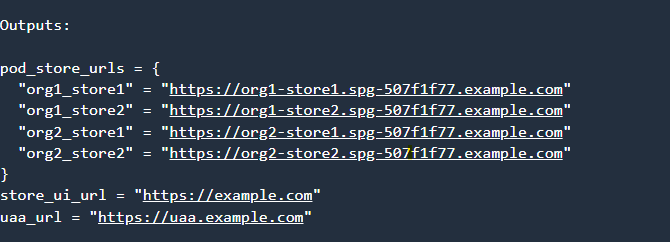
Captured on the 1.x stack, whose outputs were pod_store_urls, store_ui_url and uaa_url. 3-apply now ends with terraform output console_url, and the full output set is console_url, urls, pods, core_namespace, dashboard_url, flavour, service_count and hibernated.
6. First sign-in
Open the console_url (https://console-ui.<env-domain>). The platform admin's username is admin and the initial password is the COM_ASREVO_CVHOME_ADMIN_PASSWORD key of the Secrets Manager secret /<project>/<env>/uaa. Retrieve it yourself from the Secrets Manager console or with the CLI; it is never printed by the pipeline, and this guide will not show one.
aws secretsmanager get-secret-value --secret-id /<project>/<env>/uaa --query SecretString --output textuaa writes its client secrets into its database at boot while uaa_seed_on_boot is true (the default), which a fresh environment needs once. Switch it off in a long-lived environment after the first apply so an operator's password change survives a restart.
7. Where to look
| Console | What you should see |
|---|---|
| ECS, Clusters | <project>-<env>-store-core with 6 services (7 with the collector) and <project>-<env>-store-pod-<id> with 9 services per pod |
| RDS | one instance for core and one per pod, or a single instance in dev and ephemeral (rds.shared) |
| Route53 | alias records for the apex, www, uaa, console-ui, spg-<id> and its wildcard, and cdn-<id> (A and AAAA) |
| ACM | one certificate in the stack's region and one in us-east-1, both for <env-domain> and *.<env-domain> |
| Secrets Manager | /<project>/<env>/stripe, /uaa, /sso |
| Systems Manager, Parameter Store | /<project>/<env>/config, /prereq, /hibernated |
| CloudFront | one distribution per pod, aliased to cdn-<id>.<env-domain> |
| CloudWatch, Dashboards | <project>-<env> (every flavour except ephemeral) |

Captured on the 1.x stack (5 core and 7 pod services, Container Insights on). The current core cluster runs 6 services plus the collector where monitoring is on; a pod runs 9; Container Insights follows the flavour's monitoring flag.
After the first run
- Promoting a version, rolling back and re-running the build are on pipeline and promotion.
- Pausing the environment without losing it is on hibernate, wake, destroy.
- Reading logs and the dashboard is on monitoring and logs.
- Each pipeline stage and the first sign-in have a case in cvhome-platform
qa/platform-qa.md.
Source of truth: cvhome-platform bootstrap/bootstrap.yaml, README.md, qa/platform-qa.md, services.yaml, flavours.yaml, main.tf, outputs.tf, .github/workflows/publish-bootstrap.yml; orchestrator .claude/skills/org-router/references/known-drift.md.