
Merchant journey
From the first sign-in to a live storefront: store, catalog, content, storefront builder, domains, orders, payments and billing. The seller console is the Angular application console-ui, always reached through the platform gateway at http://gateway.com:8000 on a local stack. Every screen below is store-scoped: the store switcher in the toolbar picks the store, and every request the console makes carries that store's id.
Sign in
The console renders the sign-in form itself, but the identity behind it is uaa, the staff authorization server. Opening the console signed out shows a short "checking your session" state, then the gateway starts the OAuth2 flow and comes back to the console's own sign-in page. Username and password sit on one card with a "forgot password" link; a wrong password returns you to the form with a translated refusal and the attempts left. When identity providers are configured, a button per provider appears under the credentials. Signing out ends both sessions, the gateway's and uaa's, so the next visit shows the form again. Invitation and password-reset links land on the console too; a used or bogus token says the link cannot be used. Details of the flow are on Authentication.
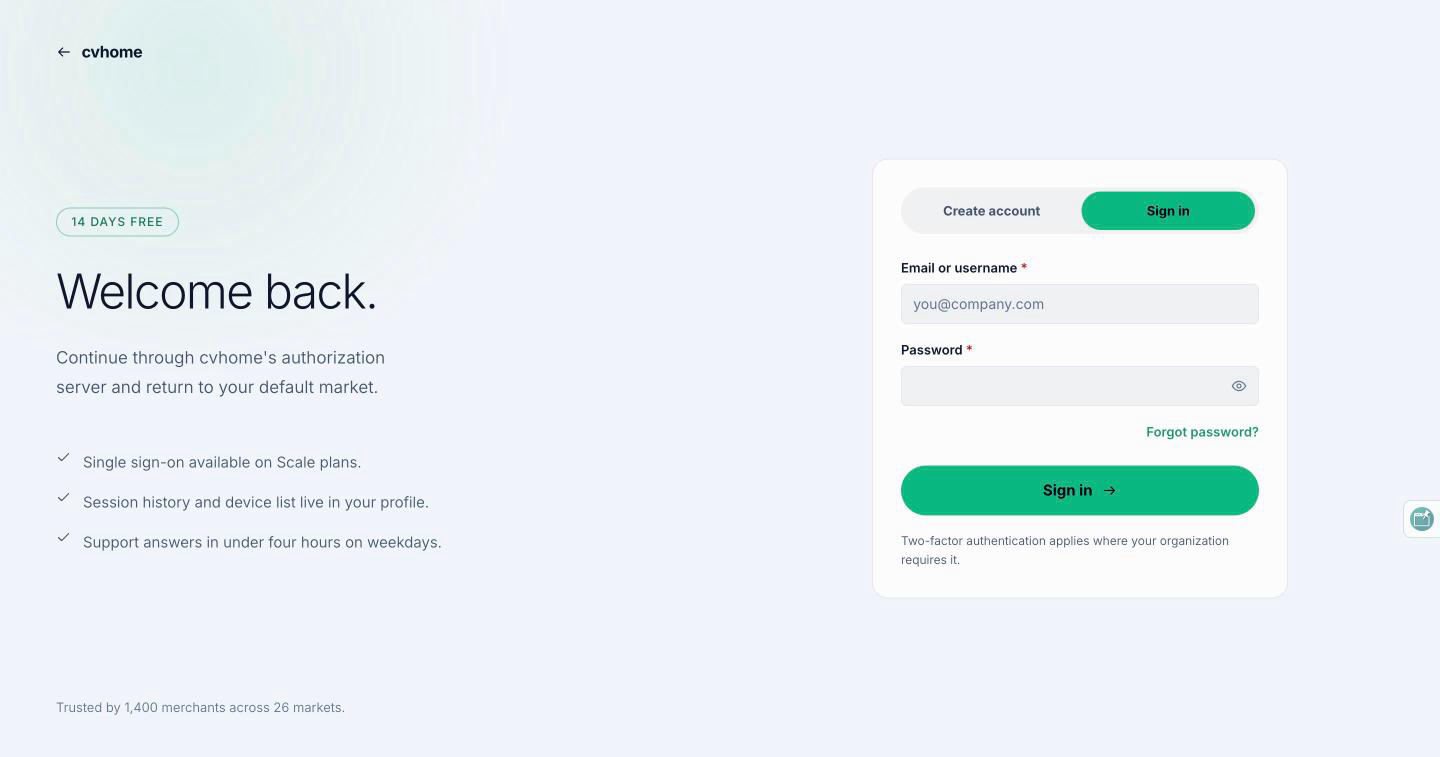
Locally, sign in as org1-admin (organization admin of the seeded org1) or org1-store1-admin; both use the seed password admin. These are test fixtures that exist only when the test-stores profile is active.
First run and creating a store
An organization with no store lands on a first-run screen. It lays out the four steps that make a store sell (create the store, add products, design the home page, connect payments), short guides (CSV import, the home page, going live, a second language) and the plan limits that apply: stores, products, seats and storage.
Creating a store asks for the store's name, its languages, its currency and its storefront host, and shows what the platform provisions behind the scenes: a database in a pod, the node the store runs on, the domain, the locale and the owner. The store row is written in tenancy and the store itself is created asynchronously inside the pod it was placed in; the screen reflects the provisioning state. A new organization's first store gets a trial; the second does not, and unpaid stores are capped, after which creation is refused with a billing quota error. When the store exists, the screen points at the next steps: logo and branding, domain, payments and the first product. What a pod is and how placement works is on Tenancy and provisioning.
Dashboard
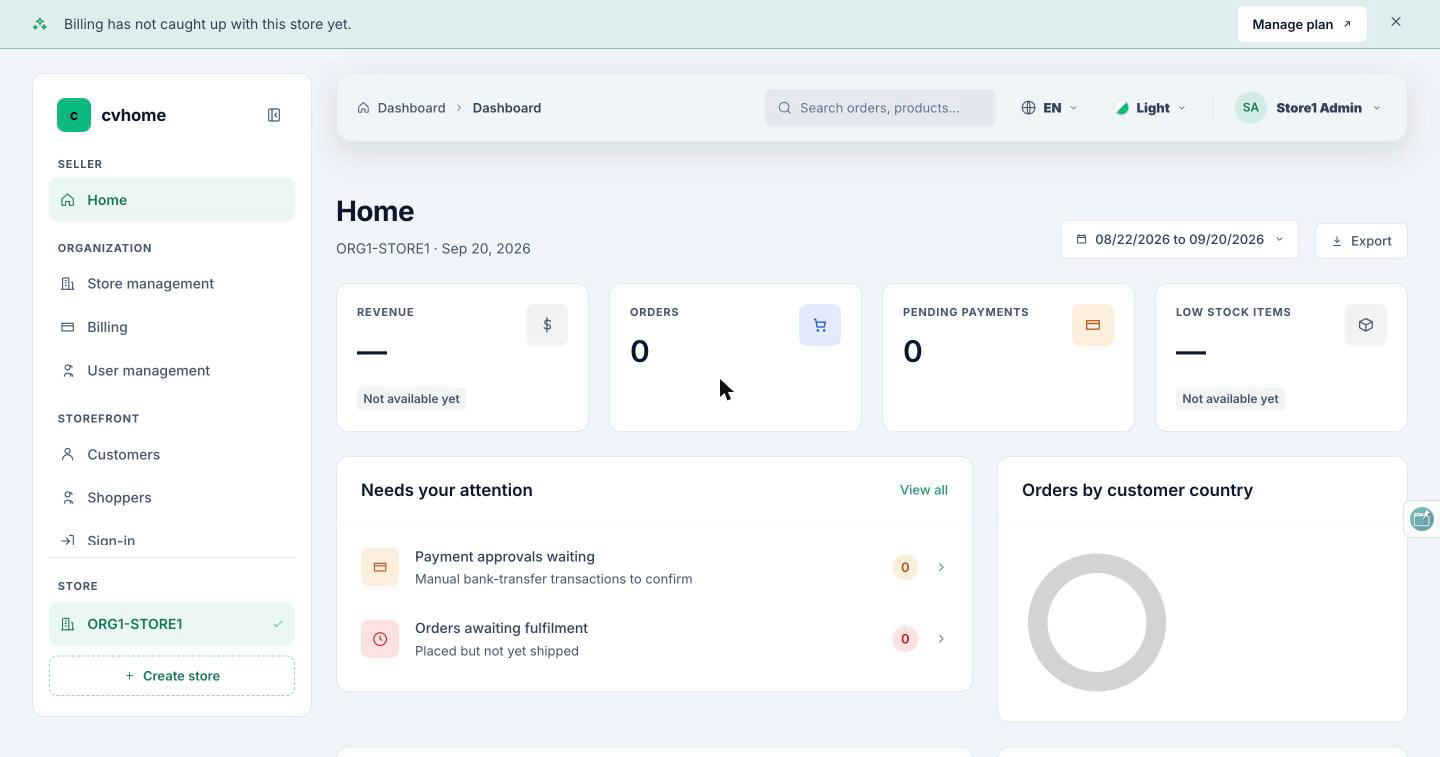
The dashboard is the store's overview: KPI cards and ranked lists for the selected store, with an explicit "unavailable" state when a figure cannot be computed rather than a zero. The three statistics charts (orders, revenue and average order value) are the checkout service's StatisticApi and are scoped to one store.
Catalog
The catalog module has tabs for categories, brands, product types, product groups and the store-wide option vocabulary. The category tab is a tree: create a root, add a child, rename, move, hide and delete. Brands and types are flat lists; groups collect related products, and the related-products picker searches by SKU.
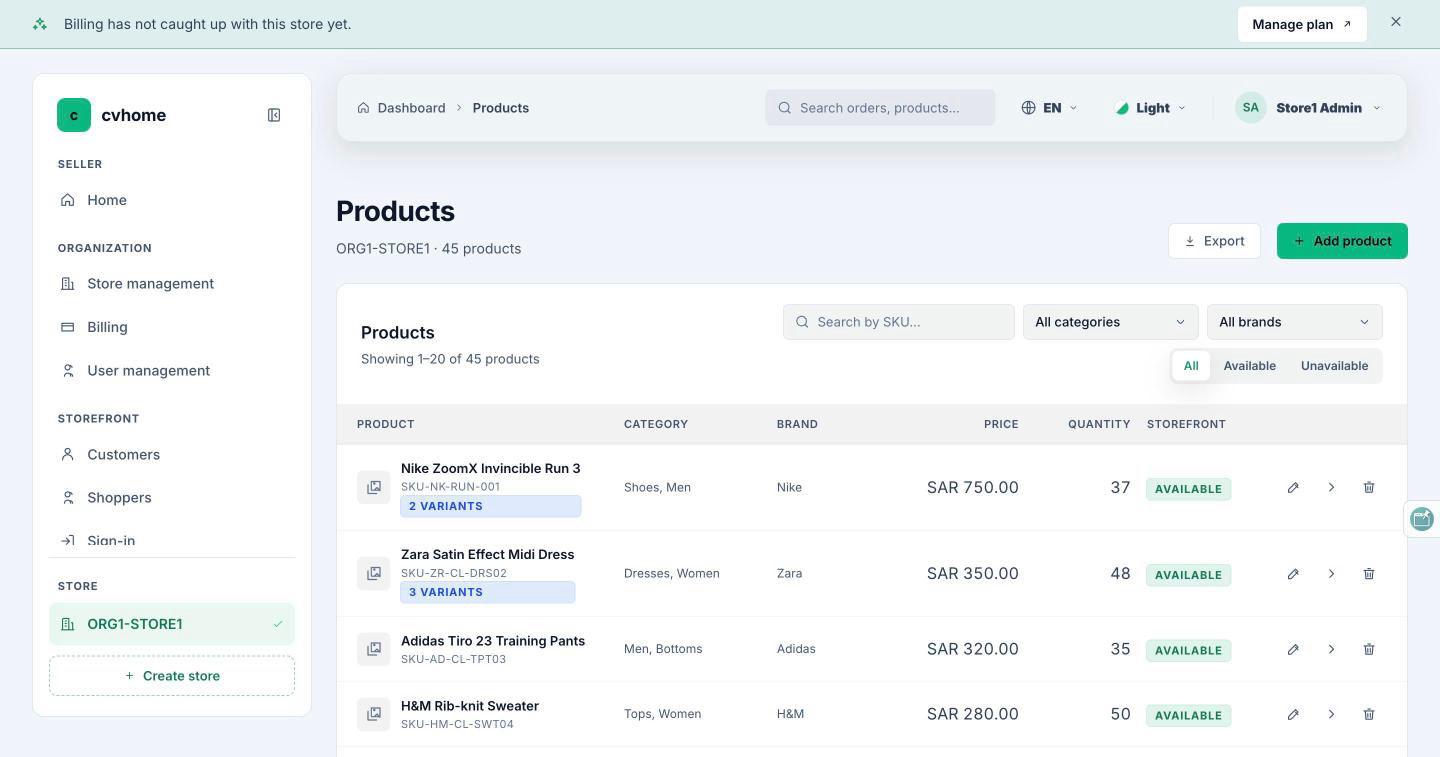
The products table merges two services: names, categories, brand and image come from catalog, while price and quantity come from inventory in one bulk call. Inline edits of price, quantity and availability write to both. The product form is a stepped editor: definition, categories, options and variants, pricing and stock, images. Every product owns at least one variant; SKU, price and stock live on the variant, and the form refuses a SKU the server would reject before sending anything. Creating a product is two writes, one to catalog and one to inventory, and a partial failure is reported honestly. Product images are picked from the content service's media library. A store moderator can open every screen and is refused on every write.
Content
The content hub shows four KPI cards (published, drafts, awaiting translation, media) and seven tabs: pages, blog posts, banners, FAQ entries, legal policies, navigation menus and the media library. Each type has an editor with a status workflow (draft, published), scheduling, revisions and a per-locale translation strip that opens on the store's source language. Save and publish are never dead buttons: an incomplete publish scrolls to the first offending field and names it. Errors are specific to the cause, in every console language. The store's home page and its snippet text are edited here too, since the storefront's home is a layout document owned by the content service.
Storefront builder
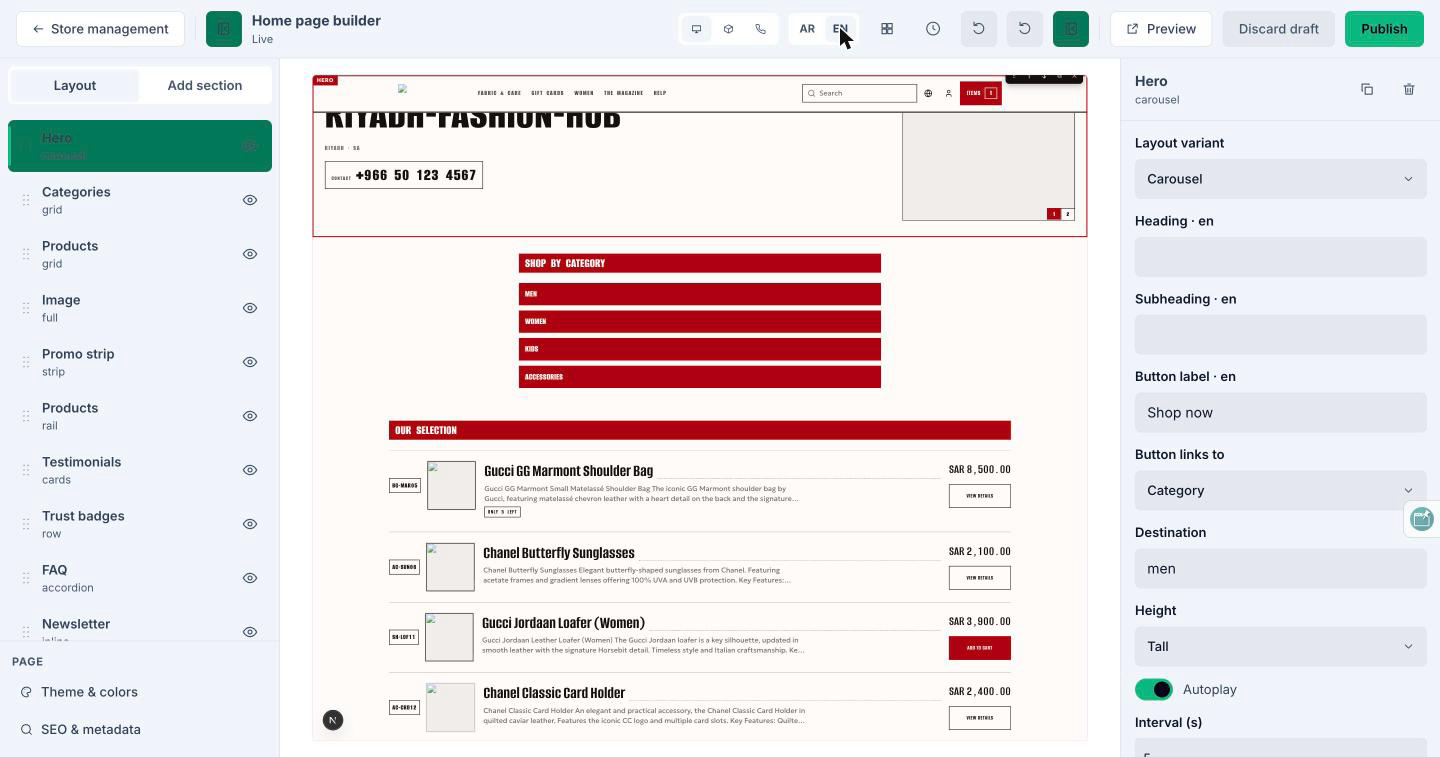
The storefront builder edits the store's home page as an ordered list of sections. A layer list on one side, a section library to add from, and an inspector for the selected section's fields; the fields are generated from the manifest the storefront serves, so what the inspector offers is what every theme can render. The center is a live preview of the real storefront in a frame; the builder talks to it with postMessage, and the storefront renders the draft through a preview token so unpublished changes never reach shoppers. Themes are chosen per store and the merchant's color preset is applied through a contrast-guarded bridge, so a theme frames the merchant's brand rather than replacing it. Publishing an incomplete section is refused.
Store management
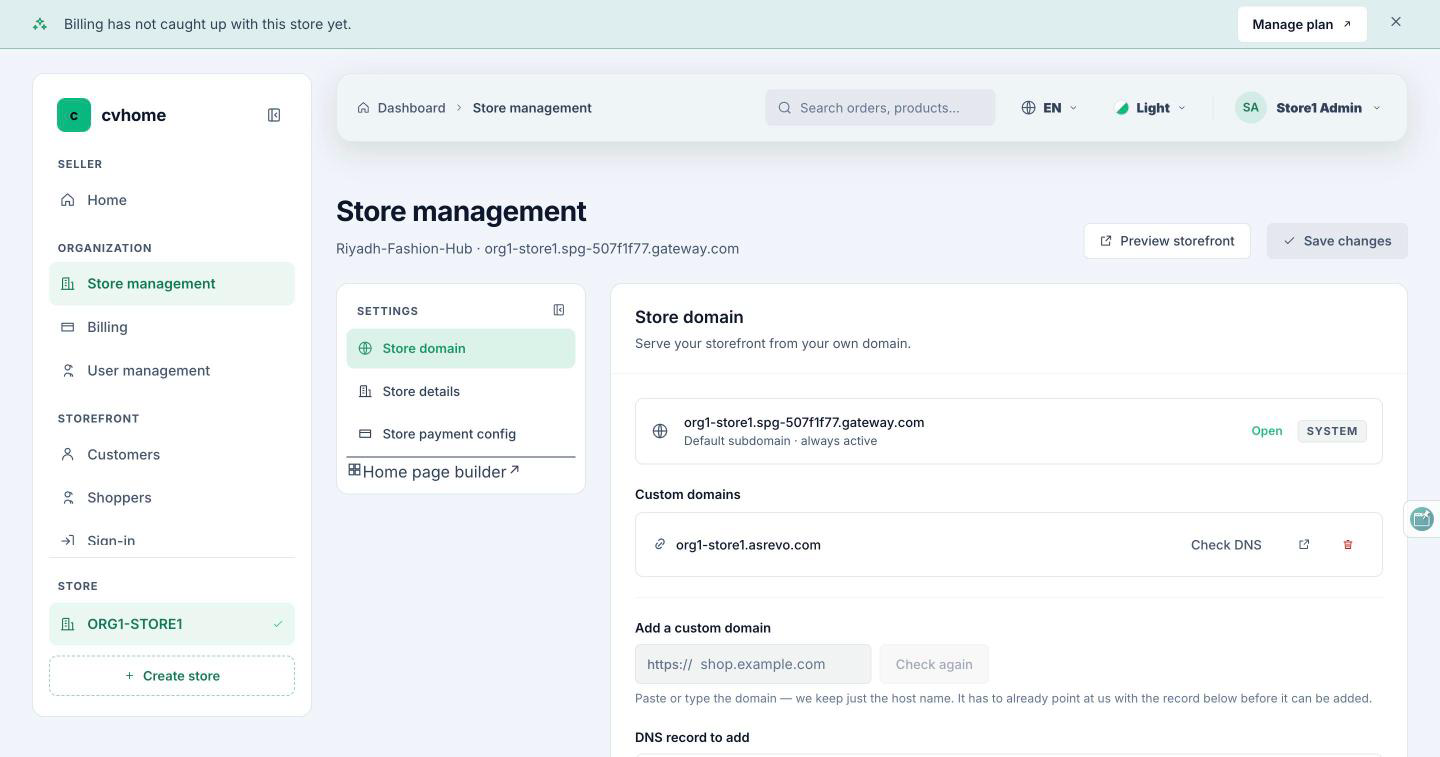
Store management is eight sections behind one navigation rail: details, address, branding (logo, banner and slider images, with the shape of an image checked before it is uploaded), social links (a link must belong to the provider whose row it is in), the home section text, payments, the domain, and a link into the home page builder. Fields the platform does not record render disabled with the reason beside them.
The domain section shows the store's default subdomain (<label>.<pod domain>) and the CNAME target, and lets the merchant add a custom domain. The console refuses a domain whose DNS does not point at the platform. Once allocated, the domain resolves to the store immediately: the pod's edge asks the merchant service who owns a host name, and TLS for it is issued on demand the first time a browser connects, only for host names the pod actually serves. The same domain cannot belong to two stores. How the edge does this is on Edge and custom domains.
Customers and shoppers
Two screens, two identity sources. Customers lists the store's customer records from the checkout service: one row per store and shopper account, created on the first order and refreshed from every later checkout; a guest checkout keys the row on the email address. Opening a customer shows the profile and their orders. Shoppers lists the store's sign-in accounts held by cua, the shopper authorization server, with a row menu limited to what a merchant may do and a sessions pane that says where an account is signed in. Sign-in providers for the storefront, including one the merchant types in, are managed next to it.
Orders
The orders list is newest first, filterable by status, with KPI cards for orders and average order value. An order's detail page shows the snapshot taken at placement (so later catalog edits do not change it), the lines with their variant combination, the totals in the store currency, the payment status and the event ledger. From here a merchant moves the order forward one legal step at a time, cancels it, or opens the customer's profile. Flagged orders (a payment that arrived after a cancellation, a recovery that gave up) are visible in the list. Another store's seller sees nothing of this store's orders.
Payments
The payments module configures the store's providers and reviews transactions. Provider configuration (Stripe keys among them) is stored encrypted; the database only ever holds an opaque envelope. Transactions that need a human decision, such as a manual bank transfer, are approved or rejected from a dialog with the order summary beside it; approving confirms the order, rejecting cancels it and releases the reserved stock. Stripe webhooks are verified by signature and applied once, however many times they are delivered.
Subscription and billing
The billing screen follows the store switcher: status, plan, renewal date and invoices change with the store. Plan cards list the same features in the same order so they compare like for like, with a month/year toggle. An unpaid store buys a plan through Stripe's hosted checkout; an upgrade applies immediately and charges the difference, a downgrade is deferred to the end of the paid period, and stopping renewal keeps the store working until then. Invoices link to Stripe's own PDF. Plan quotas (stores, products, seats, storage) are enforced by the services the merchant uses, and a lapsed store's storefront keeps selling while its console is blocked.
Users and roles
The users screen is the store's team: create, edit, enable, disable and delete accounts, and invite people by email. An invitation shows its token once and is never listed again; resending rotates it. Roles are store admin and store moderator (read-only); an organization admin is in no store's list, and the page says so. The role picker never offers the platform administrator role. A platform administrator can act as a merchant from the account list, with a banner that ends the impersonation.
Profile
The account page shows who is signed in and their preferences: language (English and Arabic, with Arabic laid out right to left) and one of four console themes, remembered across reloads. There is no password control here; passwords are changed through uaa's one-time links.
Source of truth: cvhome store-core/console-ui/src/app/features/ (feature folders and *.content.ts), store-core/console-ui/qa/console-ui-qa.md, store-pod/merchant/merchant-service/qa/merchant-qa.md, store-pod/catalog/catalog-service/qa/catalog-qa.md, store-pod/content/content-service/qa/content-qa.md, store-pod/checkout/checkout-service/qa/checkout-qa.md, store-pod/payment/payment-service/qa/payment-qa.md, store-core/billing/billing-service/qa/billing-qa.md, store-core/tenancy/tenancy-service/qa/tenancy-qa.md, store-pod/landing-ui/themes/ARCHITECTURE.md, .claude/skills/project-structure/references/authentication.md.